
Decimal to Hexadecimal Converter
Convert decimal numbers to their hexadecimal equivalent.
Result:
Decimal to Hexadecimal Converter: Free Online Tool & Step-by-Step Guide
Hexadecimal (base-16) is a widely used number system in programming, web development, and computer engineering. Understanding how to convert decimal to hexadecimal is essential for working with memory addresses, color codes (like in CSS), and low-level system debugging.
Our free Decimal to Hexadecimal Converter provides instant, accurate results with a detailed breakdown of the conversion process. This comprehensive guide will cover:
- How to easily use our online converter tool
- Two simple manual conversion methods (e.g., division by 16)
- Practical applications of decimal to hexadecimal conversion
- Common conversion examples and a quick reference table
- Answers to frequently asked questions (FAQs) about hex conversion
How to Use Our Decimal to Hexadecimal Converter Online
Our decimal to hex conversion tool is fast, accurate, and works seamlessly on any device, from your desktop to your smartphone. Follow these simple steps for quick conversions:
- Enter a Decimal Number: Input any positive decimal number (e.g.,
255,1024,65535) into the designated field. Our tool efficiently supports a wide range of positive integers, from small to very large numbers. - Click “Convert”: The tool processes your input instantly, providing the hexadecimal equivalent.
- Get the Hexadecimal Result: View the precise hexadecimal output, accompanied by a clear, step-by-step explanation of how the conversion was performed.
Example Conversion:
- Decimal Input:
255 - Hexadecimal Output:
FF
Why Use Our Free Decimal to Hex Converter Tool?
- No software download required: Access our online decimal to hexadecimal converter directly from your web browser. No installations, no hassle.
- Works for large numbers: Convert substantial decimal values into their hexadecimal counterparts with ease, such as
65,535transforming intoFFFF. - Includes step-by-step explanation: Our tool doesn’t just provide the answer; it helps you understand the logic behind every decimal to hex conversion, making it an excellent learning aid.
- Highly accurate and reliable: Trust our converter for precise results every time.
Popular Number base Converters
- Convert Binary to Decimal
- Convert Decimal to Binary
- Convert Hexadecimal to Decimal
- Convert Binary to Hexadecimal
- Convert Hexadecimal to Binary
Decimal to Hexadecimal Conversion: Manual Methods Explained
For those looking to understand the underlying mathematics of how to convert decimal to hexadecimal, here are two common manual conversion techniques used in various technical fields.
Method 1: Division by 16 (Standard Approach)
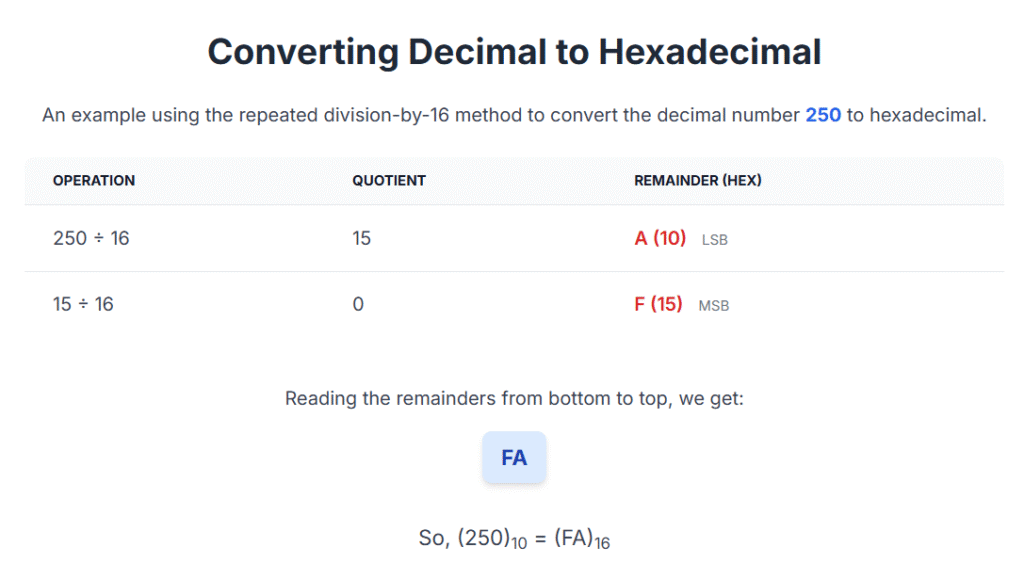
This is the most common and straightforward method taught for decimal to hexadecimal conversion. It involves repeatedly dividing the decimal number by 16 and recording the remainders. These remainders (0-9, A-F) form the hexadecimal equivalent when read in reverse order.
Example: Convert 300 (Decimal) to Hexadecimal using Division by 16
| Division | Quotient | Remainder | Hex Digit |
|---|---|---|---|
| 300÷16 | 18 | 12 | C |
| 18÷16 | 1 | 2 | 2 |
| 1÷16 | 0 | 1 | 1 |
Export to Sheets
✅ Result: Reading remainders from bottom to top: 12C
Method 2: Binary Intermediate (Alternative Method)
This alternative method is particularly useful if you are already comfortable with decimal-to-binary conversion. It leverages the relationship between binary and hexadecimal (one hexadecimal digit represents exactly four binary digits).
- Convert the decimal number to binary first.
- Group the binary digits into 4-bit chunks, starting from the right. Pad with leading zeros if necessary to make full 4-bit groups.
- Convert each 4-bit group directly to its hexadecimal equivalent.
Example: Convert 300 (Decimal) to Hex via Binary
- Binary of
300:100101100 - Grouped (from right, adding leading zeros):
0001 0010 1100 - Convert each group to Hex:
0001(binary) =1(hex)0010(binary) =2(hex)1100(binary) =C(hex)
✅ Answer: 300 (Decimal) = 12C (Hexadecimal)
Practical Applications of Decimal to Hexadecimal Conversion
Understanding how to convert decimal to hexadecimal is crucial across various technical domains:
- Web Development (CSS Colors): Hex codes like
#FFFFFF(white),#000000(black), or#FF0000(red) are standard for representing RGB color values in HTML and CSS. Developers constantly convert decimal RGB values to hexadecimal. - Low-Level Programming: In languages like C/C++ or assembly, memory addresses are almost always expressed in hexadecimal (e.g.,
0xFFFF). It’s essential for working with pointers, memory mapping, and debugging. - Debugging & Data Analysis: When analyzing raw binary data (e.g., in network packets, executable files, or memory dumps), displaying it as a “hex dump” makes it far more readable and manageable than raw binary.
- Academic Exams & Certifications: Decimal to hexadecimal conversion is a common topic in computer science and engineering tests, including university exams and professional certifications.
- Digital Electronics & Embedded Systems: Hardware registers, microcontroller settings, and data sheets often use hexadecimal values for configuration, making this conversion skill vital for embedded systems development.
Decimal to Hexadecimal Conversion Table (Quick Reference)
This table provides a quick reference for common decimal to hexadecimal conversions for your convenience.
| Decimal | Hexadecimal |
|---|---|
| 0 | 0 |
| 1 | 1 |
| 10 | A |
| 15 | F |
| 16 | 10 |
| 255 | FF |
| 1024 | 400 |
| 4096 | 1000 |
| 65535 | FFFF |
Export to Sheets
Frequently Asked Questions (FAQ) about Decimal to Hexadecimal Conversion
Q1: How do I convert negative decimal numbers to hex?
Negative decimal numbers are typically converted to hexadecimal using the two’s complement representation, just as with binary. You convert the absolute value to binary, then apply the two’s complement, and finally group the resulting binary into 4-bit chunks for hex. (Outbound Link Suggestion: Link “two’s complement” to a highly authoritative resource explaining it in detail, like a university computer science page or a trusted technical reference.)
Q2: Can I convert floating-point decimal numbers to hexadecimal?
Yes, but it’s a more complex process than integer conversion. Floating-point numbers (decimals with fractions) are usually converted to their hexadecimal representation via the IEEE 754 standard, which defines how such numbers are stored in binary format within computer memory. (Outbound Link Suggestion: Link “IEEE 754 standard” to its Wikipedia page or a technical article explaining it.)
Q3: Why is hexadecimal used instead of binary in computing?
Hexadecimal is used because it offers a shorter, more human-readable representation of large binary numbers. Each hexadecimal digit corresponds to exactly four binary digits (a nibble). This makes it much easier to read and write long strings of binary data, like memory addresses or color codes, without losing the direct mapping to binary.
Q4: What does ‘0x’ mean when I see it with hex numbers?
The prefix 0x (or sometimes H as a suffix, e.g., FFH) is a common notation in programming languages (like C, C++, Java, Python) to explicitly indicate that the following number is in hexadecimal notation. For example, 0xFF clearly means the hexadecimal value FF, not the decimal value 255.
Q5: What’s the largest 16-bit hexadecimal value?
The largest 16-bit hexadecimal value is FFFF. In decimal, this is equivalent to 65,535. This often represents the maximum value for a 16-bit unsigned integer in computer systems.
Conclusion
Mastering decimal to hexadecimal conversion is a crucial skill for anyone involved in programming, web development, or digital systems. Our free online tool makes these conversions instant and effortless, while understanding the manual methods provides a deep, invaluable comprehension of foundational computing principles.
🚀 Ready to simplify your work? Try our Decimal to Hexadecimal Converter now and enhance your understanding of number systems!